Try This: Laser Engrave a Business Card Holder
A business card holder is a great item to have in your pocket when networking because it shows off what your shop is capable of on the spot.
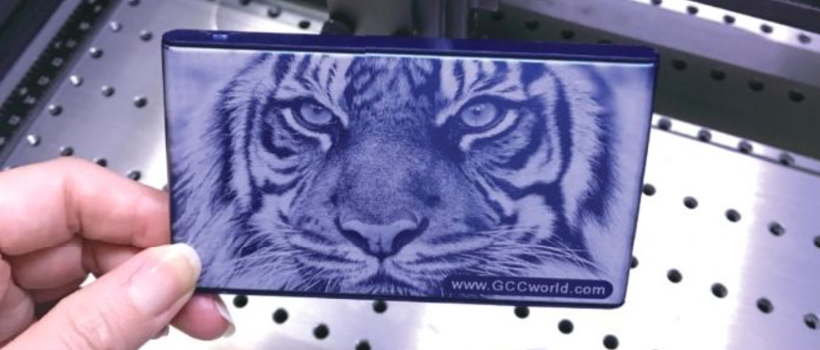
Laser engraving is one popular method used to engrave personalized images/photo-related products, including family portraits, couples’ photos, and photos of pets, on metal substrates. A business card holder is a great item to have in your pocket when networking to use as a sample of what your shop is capable of.
Materials Needed:
- Metal marking system
- Metal business card holder
Settings Used:
Note: This how-to was done using the GCC C180II laser engraver. This is a CO2 30-watt machine. Settings may vary depending on your specific machine. Also note that certain metals require a marking agent such as CerMark. Always check your substrate material before beginning.
- 2-inch lens
- Speed: 70%
- Power: 15%
- DPI: 300
Step One: Placement
Place the business card holder case on the working table of the laser machine.
Step Two: Focus
Press Autofocus to automatically set the focal distance.
Step Three: Set Parameters
Set up parameters as indicated above. Send the image file to the laser machine.
Step Four: Engrave
Press Start to begin processing. After a minute or so of your laser engraver marking the business card holder, your sample will be complete.
-Devin Huang, GCC
Author

OUR DIGITAL PARTNERS